You've heard about Ollama. It's the open-source tool that lets you run AI models locally on your computer. Maybe you're tired of paying $20/month for ChatGPT while worrying about where your data goes. Or maybe you want AI that works without an internet connection.
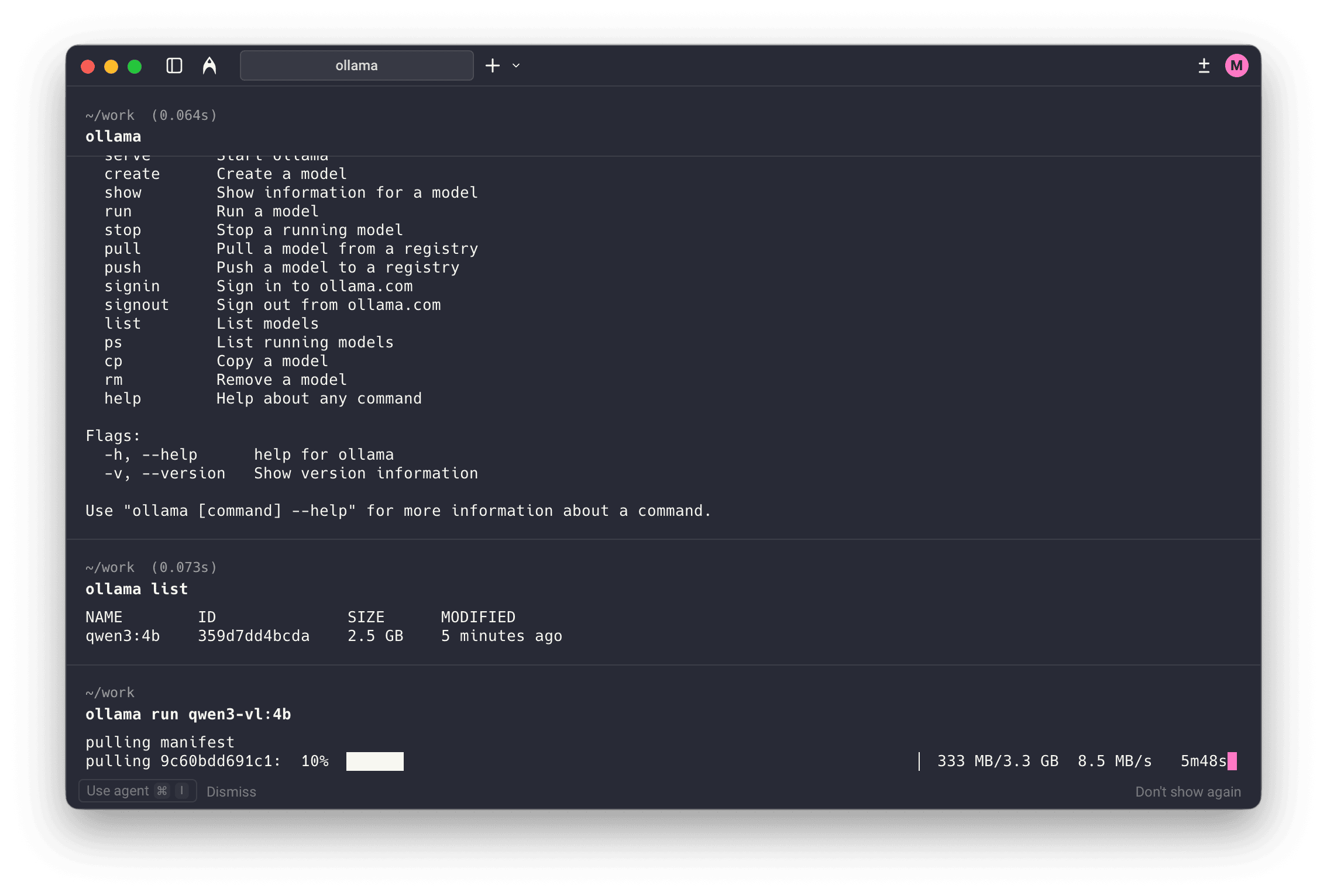
Here's the thing: Ollama is a great tool, but it wasn't designed for everyone. It's built for developers and technical users who are comfortable with the command line. If you've ever stared at a terminal window wondering what to type next, Ollama might not be for you.
What if you could get the same local AI power without the complexity?
LocalChat gives you everything Ollama offers (complete privacy, offline capability, 300+ AI models) wrapped in a beautiful interface anyone can use. No command line. No technical setup. Just download, install, and start chatting.
In this review, we'll cover:
- What Ollama actually is and how it works
- Key features and capabilities
- Pricing breakdown (spoiler: it's free, but there's a catch)
- Honest pros and cons based on real usage
- Why LocalChat is better for non-technical users
- Side-by-side comparison to help you decide
Whether you're a developer, privacy-conscious professional, or someone who just wants local AI that works, this guide will help you make the right choice.
What is Ollama?
Ollama is an open-source command-line tool for downloading, running, and managing large language models (LLMs) locally on your computer. Released under the MIT License, it's basically Docker for LLMs. It takes the complex process of running AI models on personal hardware and makes it manageable.
The core concept: Instead of sending your conversations to cloud servers like ChatGPT or Claude, Ollama runs AI models directly on your Mac, Windows PC, or Linux machine. Your data never leaves your computer.
Website: https://ollama.ai Price: Free (MIT License) Platforms: macOS, Windows, Linux
Who is Ollama designed for?
Ollama targets technical users who are comfortable with:
- Terminal/command-line interfaces
- Installing software via Homebrew or shell scripts
- Debugging error messages and configuration files
- Understanding model quantization and GGUF formats
For developers, DevOps engineers, and AI researchers, Ollama is excellent. It provides a clean API, efficient resource management, and seamless integration with development workflows.
But this technical focus creates a barrier. If you're a lawyer protecting client confidentiality, a writer seeking creative assistance, or a business professional wanting private AI, Ollama's command-line interface can feel overwhelming.
That's why LocalChat exists. It delivers Ollama-level local AI with a polished graphical interface designed for everyone.
Ollama key features
Here's what Ollama actually offers and what each feature means for daily use.
Model library
Ollama provides access to 100+ AI models including:
- Llama 3.2 (Meta's latest open-source model)
- Mistral (fast and efficient for general tasks)
- Phi-3 (Microsoft's compact but capable model)
- Gemma 2 (Google's open-weights model)
- CodeLlama (specialized for programming)
- DeepSeek Coder (advanced coding assistance)
Models are downloaded via terminal commands (ollama pull llama3.2) and stored locally for offline use.
Apple Silicon optimization
Ollama runs well on Macs with M1, M2, M3, and M4 chips. It uses Metal GPU acceleration to leverage Apple's unified memory architecture, delivering fast response times even with larger models.
OpenAI-compatible API
For developers, Ollama provides an HTTP API compatible with OpenAI's format. You can integrate local AI into applications, scripts, and workflows that already use OpenAI's API structure.
Custom Modelfiles
Power users can create custom model configurations using "Modelfiles" (similar to Dockerfiles). This allows fine-tuned control over system prompts, parameters, and model behavior.
Multi-model serving
Ollama can serve multiple models simultaneously, automatically managing memory allocation and model switching. This is useful for development environments where you need to test different models.
Ollama pricing
The simple answer: it's free
Ollama is completely free and open-source under the MIT License. No subscription fees, no usage limits, no hidden costs for the software itself.
The catch: your time
While Ollama costs $0, it demands something else: your time and technical expertise.
Setup time: Installing Ollama, learning terminal commands, and configuring your first model takes 30-60 minutes for technical users. For non-technical users, it can take hours.
Ongoing management: Updating models, troubleshooting issues, and managing storage requires ongoing technical attention.
No built-in chat interface: Ollama doesn't include a graphical chat UI. You interact via terminal commands or install and configure third-party web interfaces, adding more complexity.
The real cost calculation
For developers who live in the terminal, Ollama's "cost" is minimal. They already have the skills.
For everyone else, think about what your time is worth. If you spend 5 hours learning Ollama and troubleshooting issues, that's real cost. LocalChat costs $49.50 once and works immediately. No learning curve required.
Ollama pros and cons
Here's what Ollama does well and where it falls short based on real-world usage.
Pros
Completely free
No payment required, ever. For budget-conscious developers, this matters. You can run unlimited AI conversations without worrying about API costs or subscription fees.
Good developer experience
The command-line interface is clean and intuitive for technical users. Commands like ollama run llama3.2 are simple, and the OpenAI-compatible API makes integration straightforward.
Strong Apple Silicon performance
Ollama's Metal acceleration delivers impressive speeds on M1/M2/M3/M4 Macs. Response times rival cloud-based AI services for many tasks.
Active open-source community
With rapid growth on GitHub, Ollama benefits from continuous improvements, bug fixes, and new model support. The community is helpful.
Complete privacy
Like all local AI solutions, Ollama keeps your data on your device. No conversations are sent to external servers. No data collection.
Cons
Command-line only
This is Ollama's biggest limitation for general users. Every interaction requires terminal commands. There's no graphical interface, no visual model browser, no point-and-click simplicity.
No built-in chat UI
Want a ChatGPT-like chat experience? You'll need to install a separate web UI like Open WebUI, which requires Docker, additional configuration, and more technical knowledge.
Steep learning curve
Non-technical users face barriers:
- Understanding terminal commands
- Knowing which model to choose
- Managing model storage and updates
- Troubleshooting when things break
Fragmented experience
Using Ollama for daily AI conversations requires piecing together multiple tools: the Ollama backend, a separate chat UI, possibly additional plugins. It's not a complete solution out of the box.
No conversation history management
Ollama itself doesn't save conversation history. You either use an external UI that manages history or lose your conversations when you close the terminal.
Limited support
As open-source software, support comes from community forums and GitHub issues. There's no dedicated help desk if you get stuck.
LocalChat: The best Ollama alternative for non-developers
Here's the reality: Ollama is excellent software for developers. But if you're not comfortable with the command line, you're not Ollama's target audience.
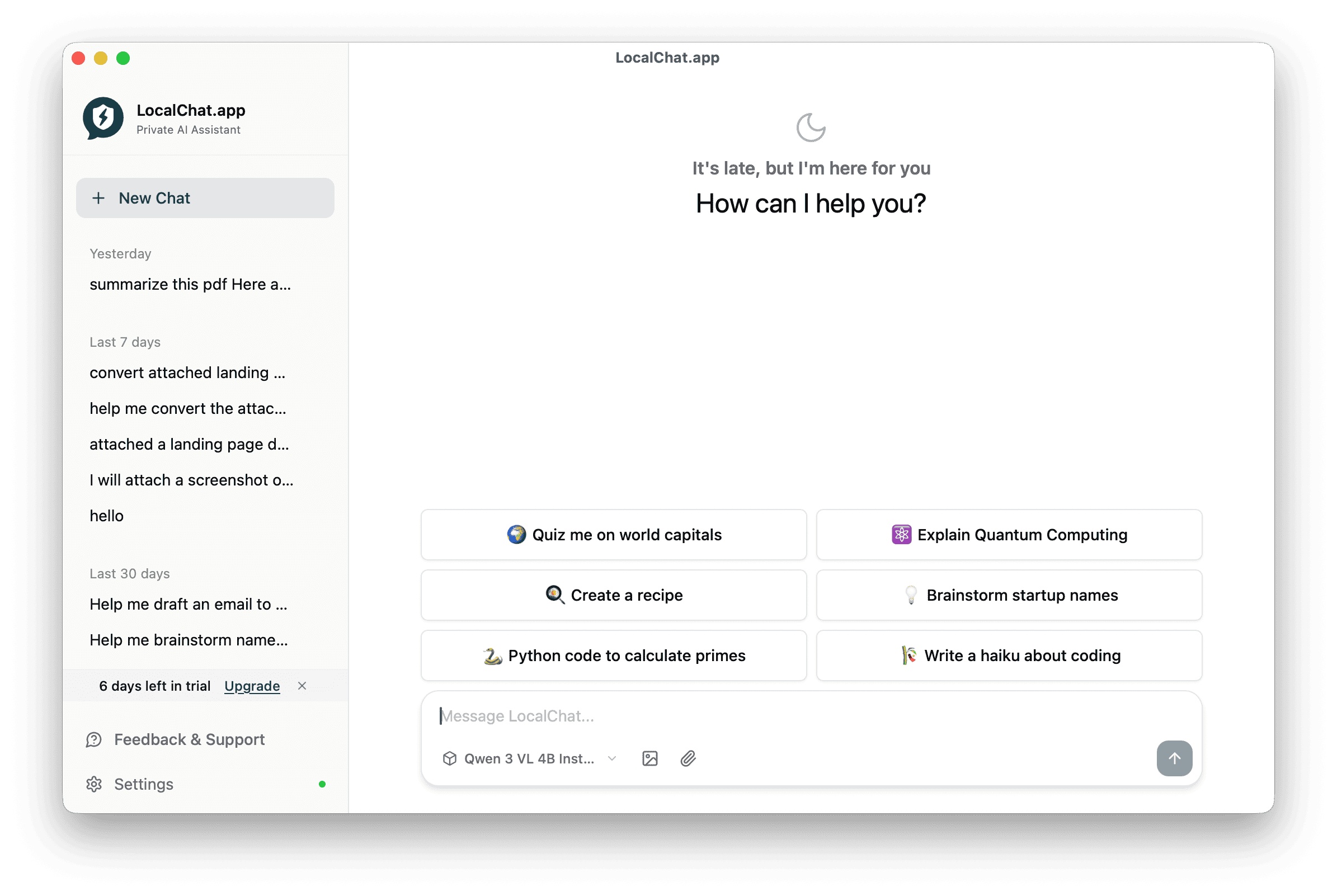
LocalChat was built for users who want Ollama's benefits without the complexity. Same local AI. Same privacy. Same offline capability. But with a beautiful interface anyone can use.
Why LocalChat is better for most users
Beautiful, native macOS interface
LocalChat looks and feels like a premium Mac app because it is. No command line. No configuration files. No terminal windows. Just a clean, intuitive chat interface.
One-click model downloads
Browse 300+ AI models from an integrated Hugging Face browser. See model descriptions, sizes, and capabilities. Click to download. Start chatting. Done.
Zero setup required
Download LocalChat. Install it. Open it. Start chatting. The process takes under 5 minutes, even if you've never used local AI before.
Conversation history built-in
All your chats are saved locally and organized automatically. Search past conversations. Pick up where you left off. Your AI history is always accessible.
One-time payment, not subscriptions
While Ollama is free, cloud AI alternatives cost $20+/month. LocalChat offers a middle path: $49.50 once, and you own it forever. No recurring fees.
Compare that to ChatGPT Plus at $240/year. LocalChat pays for itself in three months, then it's free forever.
Works for non-technical users
If you've wanted local AI but felt intimidated by Ollama's terminal interface, LocalChat is your answer. It's designed for writers, lawyers, business professionals, educators, and anyone who wants AI without the complexity.
Ollama vs LocalChat: Detailed comparison
Here's how the two options compare across the factors that matter:
| Feature | Ollama | LocalChat |
|---|---|---|
| Price | Free | $49.50 one-time |
| Interface | Command-line only | Beautiful GUI |
| Setup time | 30-60+ minutes | Under 5 minutes |
| Technical skill required | High | None |
| Model library | 100+ models | 300+ models |
| Chat UI | Requires 3rd party | Built-in |
| Conversation history | Not included | Automatic |
| Model browser | CLI commands | Visual browser |
| Apple Silicon optimized | Yes | Yes |
| Works offline | Yes | Yes |
| Privacy | Complete | Complete |
| Best for | Developers, power users | Everyone else |
Which should you choose?
Choose Ollama if you:
- Are a developer who prefers command-line tools
- Need API access for building applications
- Have zero budget (can't spend any money)
- Enjoy technical configuration and tinkering
- Already know your way around a terminal
Choose LocalChat if you:
- Want local AI without the complexity
- Prefer graphical interfaces over terminals
- Value your time more than saving $49.50
- Need a solution that works immediately
- Are recommending local AI to family, friends, or colleagues
- Want conversation history and organization features
The honest answer: If you're reading a review to decide whether Ollama is right for you, LocalChat is probably the better choice. Developers comfortable with Ollama don't need reviews. They just install it and start using it.
Other Ollama alternatives to consider
LM Studio
LM Studio is a free desktop app with a graphical interface. It's more accessible than Ollama but still oriented toward power users. The interface can feel cluttered, and there's still a learning curve.
Best for: Technical users who want a GUI but don't mind complexity.
Jan.ai
Jan is an open-source, cross-platform AI app that tries to be user-friendly. But it's feature-heavy with options that can overwhelm casual users. It also includes cloud features that complicate the "local-only" value proposition.
Best for: Users who want open-source and don't mind feature bloat.
LocalAI
LocalAI is a Docker-based solution for running AI models locally. It's powerful but requires Docker knowledge, making it even more technical than Ollama.
Best for: DevOps teams and advanced developers only.
Why LocalChat stands out
Among alternatives, LocalChat is the only option designed specifically for non-technical Mac users. It's not trying to be everything. It's trying to be the simplest, most beautiful way to run AI locally.
Frequently asked questions
Is Ollama free?
Yes. Ollama is completely free and open-source under the MIT License. No subscription fees or usage costs. But it requires technical knowledge to use effectively, which can be considered a "time cost."
Does Ollama have a GUI?
No. Ollama is a command-line tool only. To get a graphical chat interface, you must install third-party applications like Open WebUI, which requires additional technical setup including Docker.
Is Ollama safe to use?
Yes. Ollama is open-source software that runs AI models locally on your computer. Your conversations never leave your device, making it completely private and safe from data collection.
What's the best Ollama alternative for non-developers?
LocalChat is the best Ollama alternative for non-technical users. It provides the same local AI capabilities with a beautiful graphical interface, requiring no command-line knowledge.
Can Ollama run offline?
Yes. After downloading AI models, Ollama works completely offline. No internet connection is required for conversations, only for initial model downloads.
How does Ollama compare to ChatGPT?
Ollama runs AI locally (free, private, offline) while ChatGPT runs in the cloud ($20/month, data stored on servers, requires internet). Ollama gives you more privacy and no recurring costs, but requires technical skills. ChatGPT is easier to use but costs money and raises privacy concerns.
What models can Ollama run?
Ollama supports 100+ models including Llama 3.2, Mistral, Phi-3, Gemma 2, CodeLlama, DeepSeek, and many others. Models are downloaded individually and stored locally.
Is LocalChat better than Ollama?
It depends on your needs. Ollama is better for developers who want a free, CLI-based tool with API access. LocalChat is better for non-technical users who want the same local AI benefits with a polished, easy-to-use interface. LocalChat costs $49.50 but saves significant time and frustration.
Does LocalChat use Ollama?
LocalChat is an independent application with its own AI engine optimized for macOS and Apple Silicon. It provides similar local AI functionality to Ollama but with a graphical interface designed for non-technical users.
Conclusion: Is Ollama worth it?
Ollama is a good tool for the right audience. Developers and technical users who prefer command-line interfaces will find it powerful, flexible, and free. The active open-source community ensures ongoing improvements and broad model support.
But here's the honest truth: most people aren't developers. Most people don't want to learn terminal commands just to chat with AI. Most people want something that just works.
That's what LocalChat delivers:
- 300+ AI models (Llama, Mistral, Gemma, DeepSeek, and more)
- Beautiful macOS interface (no command line, no complexity)
- Complete privacy (everything stays on your Mac)
- Works offline (use AI anywhere, even without internet)
- One-time payment ($49.50 once vs. $240/year for ChatGPT)
- Zero learning curve (download, install, chat)
If you're comfortable in the terminal and want a free tool, Ollama is a solid choice. But if you want local AI that works immediately without technical hassle, LocalChat is worth every penny.
Stop struggling with command-line complexity. Get local AI that's designed for humans.